
Google Sheets for Genealogy: A Simple Research Log for Beginners
When you first start researching your family tree, it is very easy to think, “Oh, I’ll remember where I found that.”
No. No, you will not.
Genealogy has a sneaky way of turning one census record into twelve open browser tabs, three mystery cousins, two handwritten notes, and one person named William who may or may not be the right William. That is where a simple research log can save your sanity.
The good news? You do not need fancy genealogy software to start keeping track of your research. A simple Google Sheets research log can help you record what you searched, where you searched, what you found, and what you still need to check.
What Is a Genealogy Research Log?
A genealogy research log is a place to keep track of your searches. It helps you record the records, websites, books, databases, or clues you have already checked.
Think of it as your genealogy trail of breadcrumbs. Except instead of leading you through the forest, it leads you away from repeatedly searching the same record collection at midnight while whispering, “I know I saw this somewhere.”
A research log does not have to be complicated. For beginners, simple is best.
Why Use Google Sheets?
Google Sheets is a helpful tool for genealogy because it is free to use, easy to organize, and available online from different devices. You can start a sheet on your computer and open it later from another device if needed.
For genealogy beginners, Google Sheets works well because you can make a clean list of your research without learning complicated software. You can add rows, sort information, copy links, and keep notes in one place.
It is not glamorous, but neither is trying to find the same obituary six times because you forgot to write it down.
What Should You Track?
Your research log should help you answer a few basic questions:
- Who was I researching?
- What was I looking for?
- Where did I search?
- What did I find?
- What still needs to be checked?
You do not need to track every tiny thought that crosses your mind. The goal is to keep enough information that you can understand your work later.
Simple Columns for a Beginner Research Log
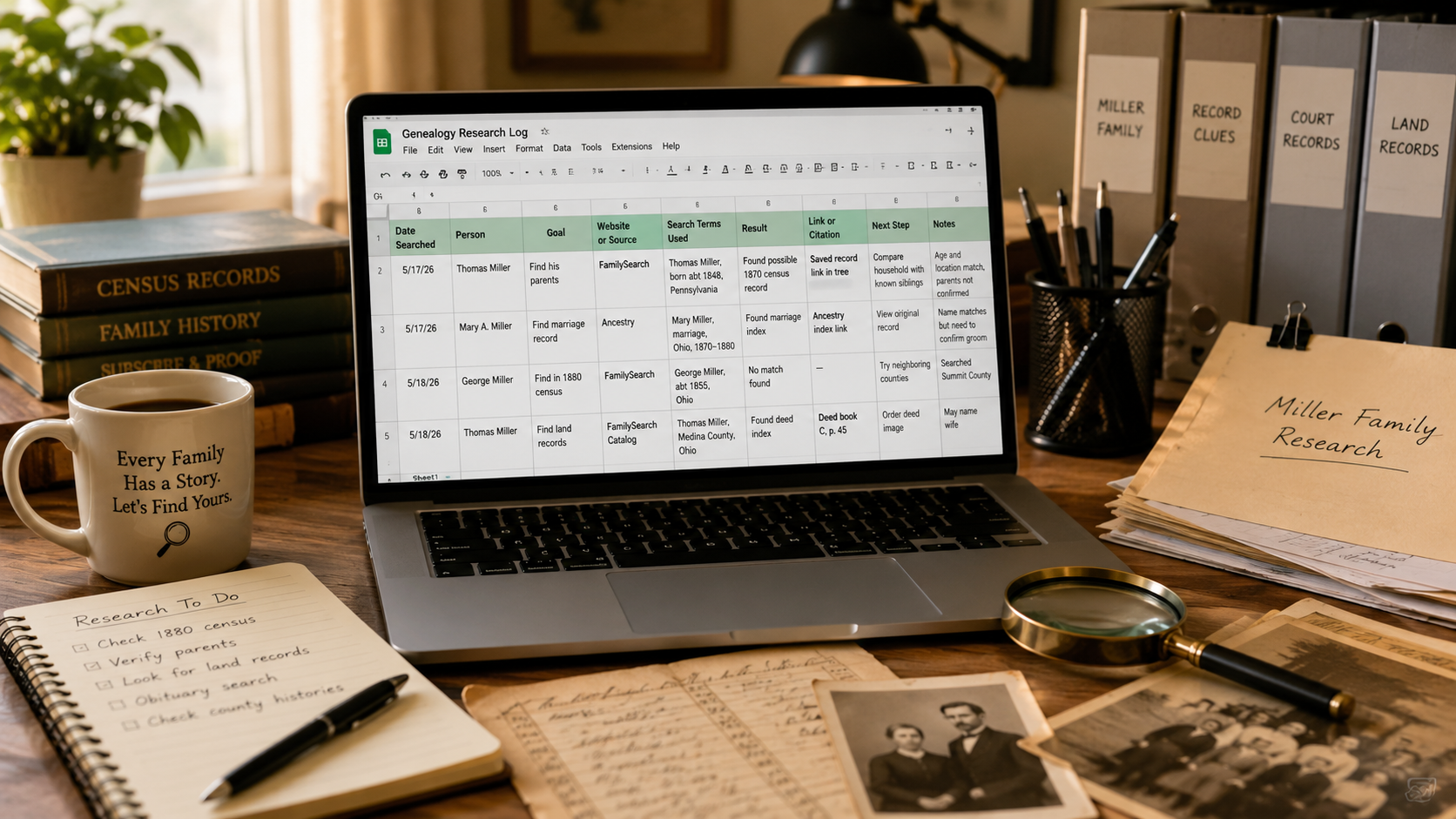
Here is a beginner-friendly set of columns you can use in Google Sheets:
- Date Searched: When you did the search.
- Person: The ancestor or family member you were researching.
- Goal: What you were trying to find.
- Website or Source: Where you searched.
- Search Terms Used: The name, date, place, or keywords you searched.
- Result: What happened.
- Link or Citation: A link to the record or a short note about where it came from.
- Next Step: What you should do next.
- Notes: Anything helpful you want to remember.
You can copy these column names directly into the first row of your Google Sheet.
Example Research Log Entry
Here is a simple example of what one row might look like:
- Date Searched: May 17, 2026
- Person: Thomas Miller
- Goal: Find his parents
- Website or Source: FamilySearch
- Search Terms Used: Thomas Miller, born about 1848, Pennsylvania
- Result: Found possible 1870 census record
- Link or Citation: Saved record link in tree
- Next Step: Compare household with known siblings
- Notes: Age and location match, but parents not confirmed yet
This does not have to be fancy. It just needs to tell you what you did and what should happen next.
Use One Sheet or Several Tabs
If you are just starting out, one sheet is enough. Keep all your research in one simple list.
Later, if your research grows, you can create separate tabs for different families, surnames, or branches of your tree. For example, you might have one tab for your mother’s side and another tab for your father’s side.
But do not overbuild it at the beginning. A research log should help you research, not become a second family tree that requires its own emotional support snack.
Color Coding Can Help
Google Sheets lets you add colors to rows or cells. This can be helpful if you want to quickly see the status of a search.
You might use simple labels like:
- Found: You found the record or answer you were looking for.
- Possible: The clue might fit, but needs more checking.
- Not Found: You searched and did not find anything useful.
- Follow Up: You need to come back to it later.
You can add these labels in the “Result” or “Next Step” column. If you like color coding, you can also highlight rows. If color coding makes you want to close the laptop and stare into space, skip it. The log still works without it.
Track Searches That Found Nothing
This is one of the most important habits in genealogy: write down the searches that did not find anything.
It may feel silly to record a failed search, but it is actually very helpful. If you searched a record collection and found nothing, that tells you something. Maybe the person was not in that place yet. Maybe the name was spelled differently. Maybe the records are missing. Maybe you need to search a nearby county.
A “nothing found” search can still move your research forward.
Add Links When You Can
If you find a useful record online, add the link to your research log. This makes it much easier to return to the record later.
You can paste the link into the “Link or Citation” column. You can also add a short note explaining what the record is, such as “1880 census household” or “marriage record index.”
Links can sometimes stop working over time, so it is also smart to write enough detail that you can find the record again if needed.
Keep Your Notes Plain and Clear
Your research log is not the place to write a novel. Save that for the ancestor who ran off to another county and changed his name spelling three times.
For each search, write short notes that explain what you found or why it matters.
Helpful notes might look like this:
- Possible match, but wife’s name is different.
- Age matches, birthplace does not.
- Same household as known child Mary.
- Need to check original image.
- Could be a cousin, not direct ancestor.
These short notes are enough to help you remember your thinking later.
Do Not Make It Too Complicated
There are many ways to build a genealogy research log. Some people create detailed spreadsheets with many columns, filters, tabs, formulas, and color systems.
That can be useful later, but beginners do not need all of that right away.
Start with a simple log that answers three basic questions:
- What did I search?
- What did I find?
- What should I do next?
If your log answers those questions, it is doing its job.
A Simple Google Sheets Research Log Layout
Here is an easy layout you can use:
- Date Searched
- Person
- Goal
- Website or Source
- Search Terms Used
- Result
- Link or Citation
- Next Step
- Notes
Put these across the top row of your Google Sheet. Then each search gets its own row underneath.
That is it. Truly. No spreadsheet goblin contract required.
Final Thoughts
Google Sheets can be a simple and practical way to keep your genealogy research organized. You do not need a complicated system to start. You just need a place to record what you searched, what you found, and what you want to check next.
A research log helps you slow down, avoid repeating searches, and make better decisions about your family tree. It also gives future-you a fighting chance of understanding what present-you was doing with all those tabs open.
Start simple. Add one row at a time. Your research will feel much easier to manage when your clues have a place to land.